


BestInterest for Coparents
4.416.00 Reviews
App Specs
- Version
- 3.0.3
- Updated On
- License
- Free
- Downloads
- 10,000+
- Developer
- BestInterest
- Categories
- Parenting
- Platform
- Android
Screenshots


 Analysis by AppCompare
Co-parenting is difficult enough without turning every message into another argument. I approached BestInterest as a practical parenting app for the moments when a short exchange about school, pickup, or a schedule change can quickly become emotionally exhausting. Its focus is AI-assisted communication and calmer coordination, so the real question is not whether it sounds useful, but whether it helps people with different needs and stressful routines communicate more clearly.
BestInterest is made by BestInterest and is available free of charge, with optional in-app purchases ranging from about ten dollars to nearly three hundred dollars per item. It belongs to the parenting category, is rated for Everyone, and runs on Android seven and later. The current release is version three point zero point three. Its average sits at 4.4 from a little over one hundred ratings, while the app has passed ten thousand installs. Those figures suggest a modest but established user base rather than a universally familiar household name.
How BestInterest handles readability and navigation
I look at readability and navigation here as part of whether a parent can use the app when time and attention are already stretched. Beyond finding a message-writing routine, it helps to consider how a person can make that routine predictable and easier to resume after interruptions. That practical question leads into the motor, sensory, and situational demands of using it.
A calmer place for difficult conversations
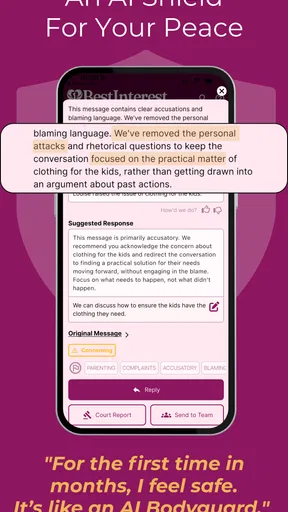
The strongest idea here is that co-parenting communication needs structure, not just another empty chat box. In a normal messaging app, a parent has to decide how to phrase a sensitive request while also managing their own frustration. BestInterest is designed around the more specific problem of communicating about children without letting adult conflict dominate the exchange.
That distinction matters for readability. A message about changing a weekend arrangement can contain several separate issues: the proposed time, the reason, transport, school materials, and a request for confirmation. When all of that is written quickly in a standard messenger, the important detail can disappear inside emotional language. A parenting-focused tool encourages me to think in terms of the practical matter first, which makes the conversation easier to follow later.
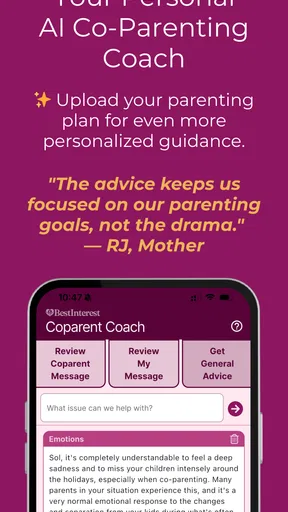
I also see value in the app’s AI angle for users who know what they want to say but struggle to say it neutrally. The useful role is not replacing a parent’s judgement. It is helping turn a reactive draft into something clearer and less likely to sound accusatory. That can be particularly helpful when the other parent reads messages literally, when written English is not a person’s strongest skill, or when stress makes it hard to organize thoughts.
Still, AI assistance should be treated as a writing aid rather than an authority. I would read every suggested wording before sending it, especially when a message involves medical information, school concerns, travel, or a disagreement about arrangements. A polished sentence can still be incomplete or unsuitable for the family’s circumstances. The app can help with tone and structure, but I would never let it make a parenting decision for me.
Worth Reading Before You Choose

EA SPORTS FC Mobile 26 Is a Bigger Football Game, but It Takes Time

Flipboard Shows What News Apps Must Do Beyond the Feed

Switching to Android Auto Means Rethinking Your Driving Routine

Google Calendar Makes a Crowded Week Easier to Manage

Ludo King Makes the Most of the Minutes Between Plans

Baby Panda World Brings Quick Play to Modern Phones, but Its Game Library Feels Busy
Useful habits for people who find messaging overwhelming
One practical approach is to separate facts from feelings before writing. I would first note the child’s appointment time, the requested change, and the action needed from the other parent. Only then would I compose the message. This reduces the chance that the main request gets buried in background frustration, and it gives any AI-assisted rewrite a cleaner starting point.
Another helpful habit is to send one topic at a time. Combining a late pickup complaint, a holiday proposal, and a school expense in one long exchange makes it harder for either person to respond completely. BestInterest is most valuable when I use its calm-parenting purpose to keep each conversation focused, rather than treating it as a place to store every unresolved disagreement.
For users with reading difficulties, attention limitations, or limited confidence in written communication, short factual messages are easier to review than long paragraphs. I would use plain language, put the requested action near the beginning, and check names, dates, and times manually. The app’s purpose supports that workflow, but the responsibility for accuracy remains with the sender.
Where navigation may still require patience
A parenting app has to balance simplicity with sensitive detail. Too few controls can make a situation feel vague; too many can make the interface tiring, particularly for someone opening it while rushing between work, school, and transport. My main judgement is that BestInterest makes sense for users willing to adopt a more deliberate communication routine, not for someone looking for an instant replacement for ordinary texting.
The free entry point makes it easier to try without committing immediately. However, the presence of optional purchases means I would check carefully which parts of the experience are available without payment before building a daily workflow around them. The purchase range is wide enough that families should consider affordability and long-term value, especially if both parents need dependable access.
Motor, sensory, and situational considerations
The next section considers how the act of composing and reviewing a message may feel for people with different physical or sensory needs, as well as in distracting moments. I find it useful to separate the benefit of calmer wording from the effort of using a phone at all; the two can matter differently from one parent to another. That distinction also sets up a closer look at family circumstances and shared routines.
Reducing typing pressure during stressful exchanges
Co-parenting often happens at inconvenient times: while carrying bags, waiting outside a classroom, or trying to settle a child. A tool that helps a parent formulate a concise message can reduce the amount of repeated typing and editing. That is a meaningful benefit for people with hand pain, limited dexterity, fatigue, or temporary injuries, even though it does not remove the need to review what is written.
I would not assume that AI support automatically makes the app accessible to every motor profile. A person who has difficulty with precise taps may still find any mobile conversation tiring, and a parent who uses assistive input may need to test how comfortably the app fits into their existing setup. The right decision is practical: install it, try the most common task, and judge whether composing and checking a message feels manageable.
For anyone who experiences cognitive overload, the best use is to prepare a routine. I would keep a small checklist beside the phone: what changed, what the child needs, what I am asking, and when I need an answer. That prevents the app from becoming another place where details are scattered. BestInterest can support calm communication, but it works better when the user brings a consistent method to it.
Sensory comfort depends on the whole phone experience
A calmer communication style can reduce emotional intensity, which is important for parents who are sensitive to conflict, rapid exchanges, or unpredictable messages. Instead of responding immediately to a provocative sentence, I can pause, identify the practical issue, and prepare a measured reply. That is a behavioral advantage rather than a claim about a particular visual, audio, or haptic setting.
I would be cautious about using any co-parenting app in a noisy or distracting environment when the message concerns a child’s safety or a complicated schedule. Reading a suggestion quickly in a supermarket queue is not the same as carefully checking it at home. For sensory-sensitive users, a quiet moment and a stable routine may matter as much as the app itself.
People who prefer voice communication may also find a text-centered workflow less comfortable. BestInterest is aimed at conflict-free written co-parenting, so it is a better match for parents who want a record they can reread than for those who solve every issue through phone calls. If a family’s communication is already respectful and fast by voice, a dedicated app may add more steps than value.
A realistic everyday scenario
Imagine that I am due to collect my child after school, but a work meeting has moved unexpectedly. In a normal messenger, I might send a rushed note saying I cannot make it and then follow up with several explanations. The other parent may not know whether I am asking them to collect the child, asking to swap a later time, or simply informing them of a delay.
Using BestInterest’s intended approach, I would identify the concrete request first: I cannot arrive at the usual time, I am asking whether the other parent can collect the child, and I can take responsibility for the next agreed handover. I would then review the wording for accuracy and tone before sending it. The benefit is not that the app solves the schedule; it helps me present the problem in a way that makes a useful answer easier.
This workflow also helps when the other parent has a different communication style. One person may prefer brief messages, while the other gives lengthy explanations. A clear request with the relevant time and action reduces the need for either person to interpret emotion or search through unrelated details.
Access across different family situations
A communication tool only helps when it fits the people expected to use it, so I turn next to the variety of co-parenting arrangements and expectations it may encounter. A useful test is whether both adults can agree on when to use written messages, what counts as urgent, and how quickly a reply is reasonably expected. Those agreements matter even when the app itself feels straightforward.
When the app is a good fit
BestInterest is most promising for separated parents who need regular written coordination but want to reduce friction. It may suit families dealing with recurring handovers, school logistics, activity schedules, shared expenses, or changes that need a clear response. It is also potentially helpful when one or both parents tend to write defensively and want assistance making messages more neutral.
The app can be especially useful during a transition period. A family may be moving from informal arrangements to a more predictable routine, and a focused communication space can encourage both parents to discuss the child’s needs rather than reopening the relationship dispute. I would still agree on basic communication rules outside the app: urgent matters should be marked clearly, routine matters should not demand immediate replies, and neither parent should use wording tools to disguise threats or pressure.
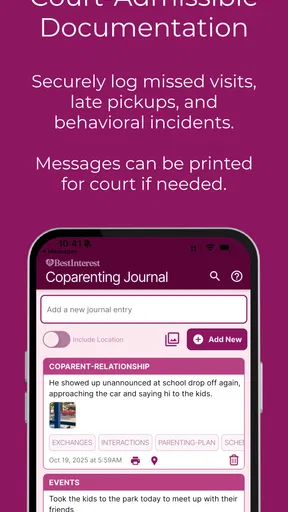
Its court-admissible positioning also makes careful record-keeping relevant to the intended audience. I would treat every message as something that should be factual, respectful, and limited to the child-related issue. That does not mean writing for a judge instead of for the other parent. It means avoiding sarcasm, speculation, insults, and unnecessary personal history. A formal-looking record is only useful when the underlying communication is responsible.
When another option may be better
I would skip BestInterest if both parents already communicate smoothly through a shared calendar and ordinary messages. Adding a new app creates another place to check, another login or routine to remember, and another possible point of disagreement. In that situation, the simplest tool that both people reliably use may be the better choice.
I would also be cautious if one parent refuses to use written communication or if the family’s urgent needs are mostly handled by live conversation. An AI writing assistant cannot solve a lack of cooperation. It can make a request clearer, but it cannot make someone respond, agree, or follow a schedule.
Families with highly complex legal or safeguarding circumstances should not treat the app as a substitute for professional advice. The calm tone may help with day-to-day exchanges, but legal orders, safety plans, medical decisions, and allegations require careful handling beyond a writing tool. In those cases, I would use the app only within advice from the relevant professional and would avoid assuming that a generated message has legal significance simply because it sounds formal.
Affordability and shared adoption
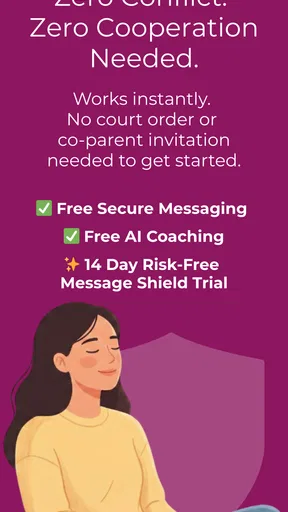
Free access lowers the barrier to testing the basic experience, which is important for parents who cannot justify another subscription immediately. At the same time, optional purchases can complicate a shared parenting arrangement if one parent expects features that the other cannot or will not pay for. Before relying on the app, I would agree on whether both parents are using the same level of access and whether the free experience is enough for the family’s routine.
The app’s Everyone rating makes it broadly approachable from an age-classification perspective, but the real audience is adults managing parenting responsibilities. A child may be the subject of a message without being the person who should operate the communication system. I would keep the focus on adult coordination and avoid involving a child in disputes or asking them to carry messages between households.
Remaining barriers and my inclusive verdict
I finish by weighing the remaining practical barriers against the app’s potential to make child-focused exchanges more manageable. My inclusive judgement depends less on a feature checklist than on whether each parent can use the same communication routine without added pressure or cost becoming a new source of conflict. That leaves a final question: who is most likely to benefit, and who may be better served by a simpler approach?
What I would check before depending on it
My first check would be whether I can complete the core task without feeling lost: open the app, prepare a message, inspect the wording, and send something accurate. My second would be whether both parents can maintain the same routine. A tool that one person uses carefully while the other ignores it will not create dependable co-parenting by itself.
I would also test the app during a calm week rather than during the middle of a crisis. That is when I can learn the navigation, understand the purchase boundaries, and decide whether the writing assistance actually improves my messages. Trying to learn a new communication system during an argument is unfair to the product and stressful for the user.
Privacy and trust deserve personal attention too. Co-parenting messages can contain sensitive information about children, schedules, health, and school. I would read the app’s current permissions and privacy explanations before entering details, and I would avoid putting more information into an AI prompt than is necessary for the message. That is a sensible habit for any digital communication service, especially one used for family matters.
My final judgement
BestInterest has a clear and worthwhile purpose: helping separated parents move from reactive messaging toward more focused, respectful communication. I like its potential for people who need help organizing a request, softening an unnecessarily sharp draft, or keeping a difficult exchange centered on the child. Its greatest accessibility benefit is not a flashy setting; it is the possibility of lowering the mental and emotional effort required to write clearly.
That benefit has limits. The app cannot compensate for refusal to cooperate, replace legal or professional guidance, or guarantee that an AI-assisted message captures the full context. Users with motor, sensory, reading, or cognitive needs should test the actual workflow rather than assuming that the parenting focus makes every interaction effortless. People who already have a reliable shared calendar and calm messaging habit may find a dedicated app unnecessary.
Overall, I would recommend trying BestInterest to co-parents who want a more deliberate written routine and who are willing to review every suggestion themselves. Start with ordinary scheduling, establish a short message format, and see whether both parents can use it consistently. If that process makes exchanges clearer and less emotionally draining, the app earns its place. If it adds another layer without improving cooperation, a simpler shared tool is probably the more inclusive choice.
Pros
- Helps organize shared parenting responsibilities in one accessible place.
- Useful for tracking expenses and keeping financial details transparent.
- Can reduce repetitive messages about schedules
- payments
- and reminders.
- Supports more consistent routines across two households.
- Provides a written record that can clarify past agreements and updates.
Cons
- Both parents may need to use the app for its benefits to be fully effective.
- Some features may require a subscription or additional in-app purchases.
- Sensitive family and financial data require careful privacy and account management.
- Notifications can become overwhelming if too many reminders are enabled.
- The app may not replace formal legal agreements or professional mediation.
FAQs for BestInterest for Coparents
What is BestInterest for Coparents, and who is it designed for?
BestInterest for Coparents is a family-management app designed to help separated, divorced, or otherwise co-parenting adults organize parenting responsibilities in one shared space. It can be useful for communicating about schedules, recording important child-related information, coordinating activities, and keeping practical details easier to find. The app is intended for parents and guardians who need clearer organization, rather than for children to use independently.
What features can help co-parents manage schedules and daily responsibilities?
The app is built around making co-parenting logistics easier to coordinate. Depending on the version and platform, users may be able to manage parenting-time schedules, appointments, school or activity information, reminders, expenses, and shared notes. These tools can reduce repeated messages and help both parents refer to the same information. Before downloading, review the current feature list because availability may vary by subscription, device, or region.
Does BestInterest for Coparents replace legal or professional family-court advice?
No. BestInterest for Coparents should be treated as an organizational and communication tool, not as a substitute for a parenting plan, court order, mediator, attorney, therapist, or other qualified professional. Although keeping records and sharing information may support better coordination, the app cannot determine custody rights, resolve disputes, or guarantee that a record will be accepted as legal evidence. Always follow the requirements that apply to your family situation.
Is my family information private and secure when using the app?
Because co-parenting apps may contain sensitive information about children, schedules, addresses, expenses, and communication, privacy should be considered before creating an account. Read the app’s current privacy policy, terms of service, permissions, data-retention practices, and security information in the Google Play Store or Apple App Store. Use a strong, unique password, enable available account protections, and share access only with people who genuinely need it.
Is BestInterest for Coparents free to download, and are there in-app purchases?
The download price and available features can change over time, so check the current Google Play or App Store listing before installing. Some family-management apps offer a free download with limited tools and place advanced features, storage, communication options, or additional accounts behind a subscription or in-app purchase. Also confirm whether both co-parents need separate accounts, whether a trial automatically renews, and how cancellation is handled.


